
4 minutes
Becoming a good computer typist may seem like a complex challenge, but various apps and websites can help improve your typing skills.
Today we have prepared a series of tips to help you improve your typing skills.
A little history
Physical and electronic keyboards, our main study tools, have more than 100 years of history.
Most of the world uses the 🔗QWERTYkeyboard layout, but others also exist, such as 🔗QWERTZ, 🔗AZERTY, local layouts, specialized layouts, and layouts for non-Western alphabets.
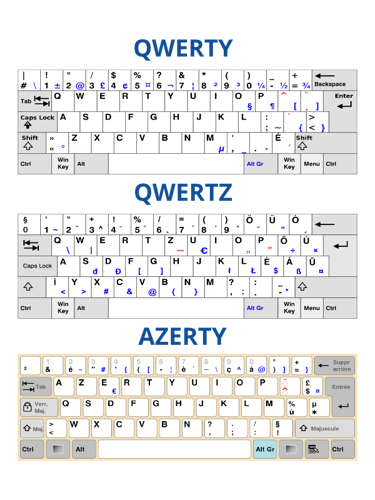
In Latin America, the QWERTY layout began gaining popularity in 1874 and has remained the method used for typing on computers, tablets, and smartphones ever since. This is despite not having been designed for Latin American users, since our most frequently used letters are not on the middle row, the easiest row to reach.
The more we practice, the faster we will become and the fewer mistakes we will make. Here are some simple tips to make the most of your keyboard skills.
Want to know a little more? We recommend this 🎙️ podcast from Cosas de internet , who spent 5 years understanding the efficiency of the keyboard we use and how to improve typing speed.
1 Follow the basic rules
Place your hands on the computer keyboard's middle row so your left fingers rest on A, S, D, F, and your right fingers cover J, K, L, and Ñ.
Each finger is responsible for the keys above and below its position on that row. Your thumbs should rest on the space bar. This is the correct finger position for efficient typing, allowing full-sized hands to reach every letter and other frequently used keys.
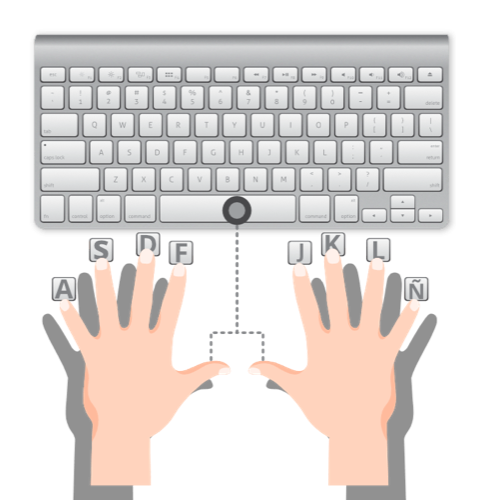
| Finger | Left hand | Right hand |
| Thumb | Space bar | Space bar |
| Index finger | F | Ñ |
| Middle finger | D | L |
| Ring finger | S | K |
| Little finger | A | J |
2 Familiarize yourself with the keys each finger should reach.
The key to fast typing is moving the fingers on the middle row as little as possible. For example, pressing “Q” with your right index finger would be inefficient because your right hand would have to leave the middle row to do it. A slight movement of your left little finger can press Q without disturbing the other fingers.
3 Memorize each letter's location on the keyboard.
Most people find it easier to group letters into left and right categories, but memorizing each of the three rows in a straight line can also be effective.
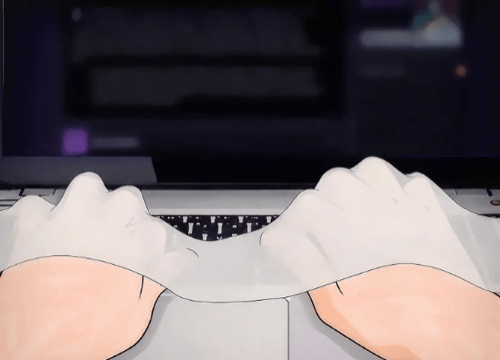
Once you have a clear idea of where the keys are, cover the keyboard. This removes the temptation to look at the keys, which ultimately only slows you down. If you do not have the side of a box to use, simply cover your hands—and therefore the keyboard—with a scarf or something similar. It is fine if you need to use Backspace often. That habit will decrease with practice.
4 Use all your fingers.
If you had only six fingers to type with, you would not even be able to reach certain areas of the keyboard quickly. Using all your fingers will therefore make you type much faster.
It is normal to have to search for each key at first. Get used to spreading your hands over the keyboard. With all 8 fingers on the middle row and your thumbs on the space bar, start typing. Let each finger handle the letters around it and use only the finger closest to the key.
5 Type as much as you can
After following the steps above, all that remains is practice. A good idea is to move your tasks onto the computer. If you have a shopping list, type it on your computer. Studying for school? Transfer your notes to the computer. Need to organize data for your taxes or your class? Time for a spreadsheet!
Search online.
Dozens of websites aim to make fast typing fun while improving your words-per-minute rate. Games, calculators, and generators are designed to make your typing faster and more accurate. Chatting will also help you get faster. 🔗Typing Maniac and 🔗Type Racer are two games that make typing fun. Many other sites focus on learning. Some generate nonsense words, which are much harder to type quickly, while others focus on combinations and finger placement. However, one of the most comprehensive is 🔗10 Fast Fingers, which is very intuitive and also lets you choose different languages.
Additional tips
- Stay calm 😌 at all times. A nervous, tense mind is prone to making more mistakes because of insufficient concentration.
- Using correct posture while typing can help you learn faster. Keep your fingers curved like claws and your back against the chair. The more comfortable you are, the longer your mind can focus on the words in front of you.
- Put on some music and try typing the lyrics in time with it. Start with a ballad, then move on to hip-hop 😉.
- What you will need most is practice; you can use your favorite text editor.
- Find long words and type them several times. You can also try typing the alphabet as many times as you can.
By doing this, you will gradually memorize the letters' locations, and before you know it, you will be typing much faster—even without looking at the keyboard!